

- Home
- About Consulate
-
Consular Services
- Important Information (Must Read)
- Book Your Appointment Online
-
Misc. Consular Services
- Miscellaneous General Information
- Fee amount and Mode of Payment
- Miscellaneous Processing Time
- Miscellaneous FAQ
- Miscellaneous Consular Service-PCC (non-Indian Passport Holders)
- Certificate of Birth (For Indian Passport holders only)
- Life Certificates & Attestation of pension papers
- NRI (Non-Resident Indian) Certificate
- Registration of Birth and Death of an Indian National
- NOC required for transportation of body/ashes back to India (For Persons of Indian Origin only)
- Attestation of affidavit, Declaration or Powers of Attorney
- Attestation of Company/Trade documents
- Attestation of documents issued by authorities in NZ
- Affidavit from parents abroad for minor in India
- Attestation of Documents by issued by Indian authorities
- Confirmation of Driving Licence Particulars
- Reissue of International Driving Permit
- tracing the roots
- Police Clearance Certificate
- OCI
- Passport
- Emergency Services
- Visa
- Liquor Permit
- Registration of Indian Nationals
- Frequently Asked Questions (FAQs)
- Citizen's Corner
- Bilateral Relations
-
Trade & Commerce
- Commercial Representative
- Indian Geographical Indications (GIs)
- Upcoming Trade Events in India
- Trade Organisations India
- List of important Trade Shows/Exhibitions in New Zealand
- Useful Indian Trade & Commerce Websites
- India New Zealand Trade Organisations
- New Zealand Trade Organisations
- Publications
- Make In India
- Invest India
- Market Research
- Videos
- Indian Diaspora
- Education
- Tenders
- Media
- Contact
Indian origin of their Spouse
Who are applying on the basis of Indian Spouse/ Spouse’s OCI Card
Please Note:
- OCI Cards issued to foreign spouse applicants are valid for an initial period of 5 years only. Subsequent renewal requires a fresh application and a mandatory personal interview of both the husband and wife at the relevant Indian Mission, Post, or FRRO.
- The foreign spouse of an OCI Card holder may apply for OCI registration provided the marriage is legally registered and has subsisted for a continuous period of at least 2 years immediately prior to the application date. The OCI Card will be granted only following a successful interview with both spouses.
Procedure
Step 1 - Submit Online Application
Submit your application on the OCI Services Portal: https://ociservices.gov.in/onlineOCI/ and upload all the required documents listed below.
Important: When filling the online application, select "Yes" in the Spouse Details column.
Step 2 - Book an Appointment
Following the submission of your online application, please book an appointment for an in-person visit to the Consulate General of India, Auckland. This is required for the verification of your uploaded documents against the originals, without which the application process cannot be finalised.
- Note: Applications registered with CGI Auckland must bear a reference number beginning with NZLA (applications starting with NZLW are not accepted).
- Book your appointment here: https://www.cgiauckland.gov.in/apt/
Please carry the following to your appointment:
- Printout of duly filled Part A and Part B of the application generated from the OCI Portal. Part B (Declaration) must be signed by the applicant.
- All original documents as listed below.
Documents Required
(To be uploaded online and carried in original to the Consulate for verification)
Please Note: All documents listed below must be uploaded on the OCI Portal at the time of online submission and carried in original to the Consulate at the time of the appointment. Applications will not be accepted if any requisite document is not uploaded or not produced in original.
- Photograph of the applicant (See specifications at the bottom of this page)
- Declaration by the OCI Applicant — (Link to the form)
- Current Passport — Original New Zealand or other foreign passport of the applicant.
- Spouse’s Indian Passport or OCI Card — (first and last page must be uploaded to the portal).
- Marriage Certificate — Original. Foreign certificates must be apostilled or authenticated by the competent authority of the issuing country.
- Birth Certificate of the Applicant — Original, apostilled.
- Birth Certificate of the Indian Origin Spouse — Original.
- Birth Certificate of Parents / Grandparents / Great-Grandparents of applicant — All copies.
- Undertaking Form for Spouse — (Link to the form)
- Previous Indian Visa (if available)
- Address Proof
- A copy of an electricity or telephone bill issued in the applicant's own name, or in the name of a parent, grandparent, or spouse.
- If the bill is in the name of any other relative, an undertaking from that relative confirming that the applicant resides with them.
- A Lease/Licence Agreement, in the case of tenants.
- New Zealand Visa and Proof of Residence (for non-NZ passport holders) — Applicants holding a passport other than a New Zealand passport must provide a copy of their valid NZ visa, along with proof of residence in New Zealand for at least the past six months.
Additional documents to be carried during application submission at the Consulate
- Fee Payment Proof — Fee of NZ$452 applicable. Payment may also be made at the Consulate using a debit card. View payment details
(Note: The above list of documents is not exhaustive. The Consulate reserves the right to request additional documents via email, in accordance with official requirements and on a case-by-case basis. )
Photograph and Signature Specifications
It is mandatory to upload both the applicant's photograph and signature image during the OCI registration process. Please ensure these digital files are prepared prior to commencing your online application.
General requirements:
- Two most recent passport-size colour photographs, taken within the last 6 months.
- The physical photograph must be affixed to the printed application form, while the digital version must be uploaded to the OCI portal. Both photographs must be identical.
- The digital signature must be uploaded to the OCI portal and must match the signature provided on the physical application form as well as the signature in the applicant's passport.
- For minor applicants unable to sign, a left thumb impression should be placed within the signature box. Parents are NOT permitted to sign on behalf of the child in this box.
- The signature or thumb impression must be in blue or black ink only and strictly confined within the prescribed box.
Photograph Specifications
Sample photograph -> 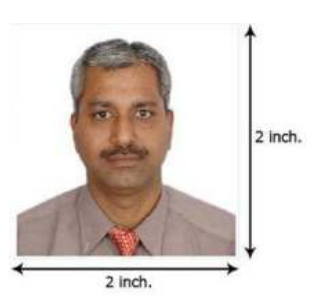
Specifications
|
Parameter |
Photograph |
Signature |
|---|---|---|
|
File format |
JPEG / JPG only |
JPEG / JPG only |
|
Maximum file size |
500 KB |
500 KB |
|
Aspect ratio |
1:1 (square; equal height & width) |
1:3 (width : height) |
|
Minimum dimensions |
200 × 200 pixels |
200 × 67 pixels |
|
Maximum dimensions |
1500 × 1500 pixels |
1500 × 500 pixels |
|
Physical size |
Not less than 51 × 51 mm with 80% face coverage |
Within the signature box, in blue or black ink |
|
Background |
Plain light colour (not white), no border |
Plain white paper |
Important: Photographs and signatures that do not conform to the above standards will be rejected and may cause delay in processing the application. Poor-quality uploaded photographs or signatures are among the most common reasons for OCI application rejection.